Project Planner KDP Interior: A Practical Asset for Publishers and Planners
The low-content and medium-content publishing market on Amazon KDP has matured significantly. Success now depends less on volume and more on the specific utility and design quality of the interior. For publishers targeting professionals, students, or organized hobbyists, the Project Planner - KDP Interior represents a functional middle ground between generic notebooks and complex productivity systems. This asset is not merely a collection of blank lines; it is a structured framework designed to facilitate actual project management within a physical format. Understanding its specifications, source file flexibility, and real-world application is essential for determining whether it aligns with your publishing catalog or personal organizational needs.
Evaluating Structural Specifications and Print Readiness
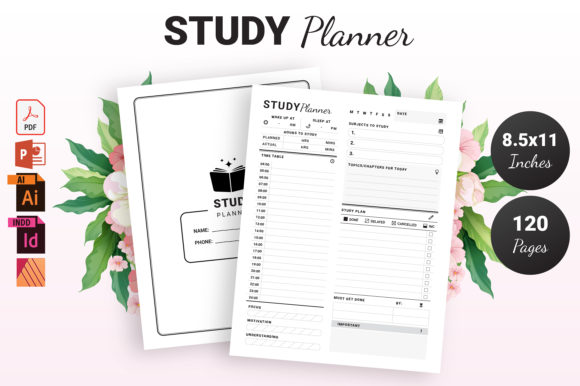
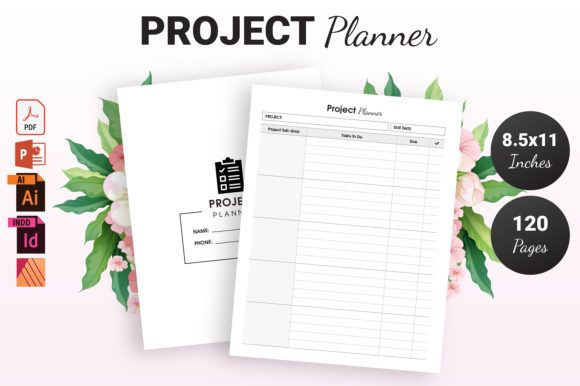
Technical compliance is the foundation of any successful KDP product. The Project Planner adheres to the industry-standard 8.5″ x 11″ dimension, which remains the most versatile size for desk-based planning tools. This footprint provides sufficient horizontal space for Gantt charts, task lists, and note-taking without feeling cumbersome to carry. The 120-page count is a strategic choice; it offers enough volume for a quarterly planning cycle or a comprehensive single-project tracker while keeping the spine width substantial enough for legible text and shelf presence.
A critical specification for this interior is the "No Bleed" configuration. From a production standpoint, this reduces the risk of trimming errors that can plague full-bleed designs. For the end-user, it ensures that all content remains safely within the margins, regardless of minor manufacturing variances. The included high-quality print-ready PDF serves as the immediate deliverable. In testing, such files typically maintain crisp vector lines and consistent opacity, ensuring that grid lines do not appear pixelated or too dark when printed on standard 55# or 60# cream or white paper. This reliability is non-negotiable for maintaining positive reviews and reducing return rates due to printing defects.
The Strategic Value of Multi-Format Source Files
What distinguishes this asset from basic template packs is the inclusion of editable source files in PowerPoint (PPTX), Adobe Illustrator (AI), and Adobe InDesign (INDD). This multi-format approach addresses the varying technical capabilities of different users. While professional designers may prefer InDesign for master page management and paragraph styles, entrepreneurs or educators might find PowerPoint’s interface more accessible for quick modifications.
- Adobe InDesign (INDD): Ideal for bulk changes, automated numbering, and precise typographic control. This is the preferred format for creating a cohesive series of planners.
- Adobe Illustrator (AI): Best suited for modifying vector graphics, adjusting layout geometry, or redesigning specific tracking elements like progress bars or icons.
- PowerPoint (PPTX): Lowers the barrier to entry for customization. Users can alter text, swap colors, and adjust sizing without specialized design software, making iteration faster for non-designers.
This flexibility transforms the product from a static commodity into a foundational brand asset. Publishers can adjust headers to match niche aesthetics, add proprietary branding, or modify the internal structure to suit specific industries like construction, software development, or academic research. The ability to customize ensures that the final product does not look identical to competitors using the same base template.
Functional Design and User Experience Analysis
A planner’s value is determined by its usability during high-stress or high-workload periods. The Project Planner interior generally avoids the trap of excessive decoration in favor of cognitive clarity. Effective project planning layouts prioritize whitespace and clear hierarchy over ornamental graphics. When evaluating this interior, one should look for logical flow: does the monthly overview connect intuitively to weekly spreads? Are there dedicated sections for resource allocation, budget tracking, and milestone review?
For the target demographic of professionals and freelancers, the layout must support both macro and micro planning. A well-designed project planner includes spaces for defining objectives alongside daily action items. If the interior relies too heavily on unstructured dot grids, it fails to differentiate itself from a standard notebook. Conversely, if it is overly rigid with pre-filled dates, it limits shelf life and usability for project-based work that doesn't align with the calendar year. The undated nature often associated with this type of KDP interior is a significant strength, allowing users to start at any time and pause without wasting pages.
Real-World Application Across Demographics
The versatility of the Project Planner extends across multiple user segments, each with distinct requirements. Understanding these nuances helps in marketing the final book or customizing the interior for specific sub-niches.
Freelancers and Creatives: This group requires a hybrid of business management and creative brainstorming. They benefit from interiors that combine task tracking with open space for sketching or mind mapping. Customizing the source files to include client invoice trackers or portfolio review sections can create a highly targeted product.
Small Business Owners: Operational consistency is key. These users need sections for inventory, employee scheduling, or quarterly goal setting. The 8.5x11 size allows for detailed tables that smaller formats cannot accommodate. Modifying the PPTX or INDD files to include industry-specific KPIs adds immense perceived value.
Educators and Students: Academic projects differ from corporate ones. Adapting the interior to include semester timelines, assignment rubrics, or study session logs makes it relevant for this demographic. The no-bleed format is particularly beneficial here, as students often annotate heavily near the edges of pages.
Corporate Professionals: For those managing cross-functional teams, the planner serves as a supplementary tool to digital software. It captures meeting notes, stakeholder concerns, and offline strategy sessions. A clean, minimalist aesthetic is usually preferred to maintain professionalism in office environments.
Quality Assurance and Customization Best Practices
While the provided PDF is print-ready, responsible publishing requires independent verification. Before uploading to KDP, always download the proof copy or use the online previewer to check margin safety zones. Even with no-bleed files, binding shifts can occur. Ensure that critical writing areas remain at least 0.375 inches from the gutter edge, especially given the 120-page thickness which creates some inner margin loss.
When utilizing the source files for customization, maintain typographic consistency. If you change fonts in Illustrator, ensure they are embedded or outlined before exporting the new PDF. For PowerPoint users, be cautious of slide size settings; verify that the canvas remains exactly 8.5x11 inches after editing to prevent scaling issues during export. Consistency in line weight and gray values is also crucial; mixing heavy black lines with faint gray guides can result in uneven printing on demand. Standardizing these elements across all 120 pages ensures a professional finish that rivals traditionally published stationery.
Assessing Long-Term Viability and Limitations
No tool is without limitations. The primary constraint of a physical project planner is its inability to sync with digital ecosystems. Users cannot set automated reminders or share updates instantly. Therefore, this product should be positioned as a companion to digital tools rather than a replacement. Marketing copy and interior introductions should reflect this complementary role, emphasizing focus, reduced screen time, and tactile memory retention.
Additionally, the 120-page limit dictates the scope. It is insufficient for multi-year strategic planning but ideal for sprint-based or quarterly workflows. Publishers should be transparent about this capacity. Creating variations—such as a 200-page annual version or a slim 80-page sprint version—using the same source files can address this limitation and expand the product line.
From a competitive standpoint, relying solely on the stock PDF without modification carries risk. As more creators access similar assets, market saturation increases. The true ROI of this purchase lies in the customization potential. Investing time to tailor the interior to a specific problem set—whether for wedding planning, software launches, or home renovations—is what generates sustainable sales and builds audience loyalty. The source files are not just an added bonus; they are the mechanism for long-term business viability.
Making an Informed Decision
The Project Planner - KDP Interior offers a balanced combination of immediate utility and long-term adaptability. Its adherence to standard specifications minimizes production friction, while the inclusion of PPTX, AI, and INDD files maximizes creative freedom. For adults aged 20–50 seeking tangible organization tools, it provides a structured yet flexible environment for managing complex tasks.
For publishers and creators, it serves as a robust starting point that eliminates the tedious setup phase of planner design. However, its effectiveness ultimately depends on thoughtful implementation. Evaluating the layout against specific user needs, verifying print quality, and leveraging the editable files to create unique value propositions are essential steps. When approached with this level of diligence, this asset proves to be a practical, reliable component of a professional publishing strategy or personal productivity system. It bridges the gap between digital efficiency and analog focus, offering a solution that respects both the creator's workflow and the end-user's need for clarity.