Evaluating the Travel Planner KDP Interior PDF for Publishing and Personal Organization
Selecting the right interior template is often the most critical step in creating a successful low-content book or establishing a personal organization system. For publishers and travelers alike, the Travel Planner KDP Interior PDF represents a specific category of pre-formatted design that balances structural utility with aesthetic appeal. Unlike generic notebooks or complex digital apps, this 8.5×11 inch, 134-page resource offers a tangible middle ground. It provides a comprehensive framework for trip planning while remaining flexible enough for customization. Understanding the specific architecture of this editable PDF helps determine whether it aligns with your publishing goals or personal travel management needs compared to other available formats.
Structural Breakdown and Functional Design
The value of any planner lies in its usability. A high-quality Travel Planner KDP Interior PDF distinguishes itself through intentional page layout rather than repetitive blank lines. The 134-page count is significant; it is substantial enough to cover multiple trips or one extensive journey without becoming too heavy for carry-on luggage. When evaluating this specific interior, several core components define its utility:
- Next Trip Page: This lined section serves as an immediate brain dump area. Unlike structured forms, it allows for unstructured ideation before committing to logistics.
- Country Information Hub: Dedicated spaces for capital cities, languages, currency, and emergency contacts reduce the need for constant internet reliance during transit.
- Destination Wish Lists: A curated section for "best places to see" helps prioritize activities when time is limited, moving beyond simple to-do lists.
- Logistics Tracker: Specific fields for departure times, accommodation details, and transport connections centralize data that is often scattered across email confirmations.
- Financial Management: A dedicated travel budget section allows for real-time expense tracking, which is essential for long-term travelers or those on strict spending limits.
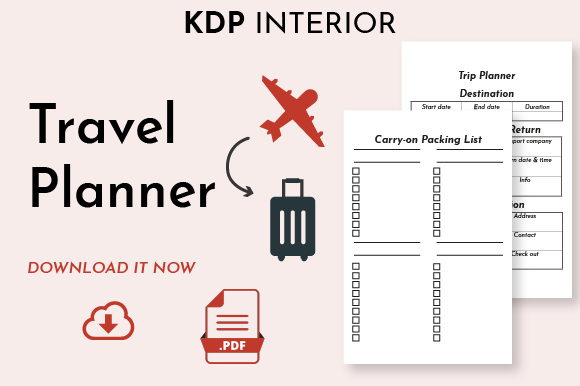
- Packing Inventory: A carry-on specific packing list addresses modern airline restrictions more effectively than generic luggage checklists.
For KDP publishers, these elements provide immediate value to the end user. For individual users utilizing the editable PDF version, these sections offer a ready-made system that eliminates the setup time required by digital note-taking apps.
Comparing Editable PDFs Against Digital Apps and Physical Notebooks
When researching travel organization tools, three primary categories emerge: proprietary mobile applications, physical retail notebooks, and downloadable templates like the Travel Planner KDP Interior PDF. Each serves a different user profile and use case.
Digital Travel Apps vs. Static Planning
Mobile applications excel at real-time updates, flight tracking, and collaborative sharing. However, they often suffer from feature bloat, subscription costs, and battery dependency. An editable PDF planner operates offline and focuses solely on pre-trip preparation and on-the-ground reference. While an app might alert you to a delayed flight, the Travel Planner KDP Interior PDF helps you conceptualize the itinerary and budget before you even book. Users who find themselves overwhelmed by notifications often prefer the cognitive clarity of a static, printable format. The tradeoff is clear: apps offer dynamic reactivity, while the PDF offers focused intentionality.
Retail Notebooks vs. Pre-Formatted Interiors
Standard retail travel journals are often either completely blank or overly rigid. Blank notebooks require the user to draw tables and headers repeatedly, which can lead to inconsistent formatting and wasted pages. Conversely, mass-market printed planners may include irrelevant sections (such as yearly calendars or holiday lists) that consume valuable page count. The Travel Planner KDP Interior PDF solves this by providing professional-grade structure without the filler. Because it is an editable file, users can also modify fields to suit specific trip types—removing the "carry-on list" for a road trip or expanding the "budget" section for a backpacking excursion. This level of customization is rarely possible with off-the-shelf physical products.
Technical Specifications for KDP Publishers
For those evaluating this resource as a product to sell, technical compliance is non-negotiable. Amazon KDP has strict printing guidelines, and a professionally designed interior must adhere to them to avoid rejection or poor print quality. This specific Travel Planner KDP Interior PDF includes several technical safeguards:
- Bleed Settings: The inclusion of bleed ensures that design elements extending to the edge of the page are trimmed correctly. Many amateur templates lack proper bleed margins, resulting in white borders or cropped content. Verifying that this file includes correct bleed safety zones is essential for a professional finish.
- Dimensions: The 8.5×11 inch size is the industry standard for functional planners. It offers maximum writing space while remaining compatible with standard home printers for proofing. Smaller sizes (like 6x9) are portable but often feel cramped for detailed itinerary planning.
- Page Count Optimization: At 134 pages, the spine width is sufficient for text printing if desired, yet the book remains lightweight. This balance affects both shipping costs and perceived value. Books under 100 pages often feel insubstantial, while those over 200 pages become expensive to print and heavy to carry.
Publishers should always download a proof copy or use KDP’s previewer tool to verify that the editable PDF maintains its integrity after upload. Fonts should be embedded, and line weights should be tested to ensure they print clearly in grayscale.
Evaluating the Editable PDF Format for Personal Use
The distinction between a "print-ready" PDF and an "editable" PDF is crucial for consumers. A print-ready file is flattened and locked, intended solely for manufacturing. The Travel Planner KDP Interior PDF described here includes an editable version, which significantly expands its utility for non-publishers.
Editability allows users to type directly into the document using software like Adobe Acrobat, Foxit Reader, or similar PDF editors. This hybrid approach combines the structure of a paper planner with the convenience of digital text entry. Users can fill out their itinerary on a laptop before departure, save the file as a backup, and then print only the relevant pages for the trip. Alternatively, they can print the entire document and bind it locally. This flexibility makes the editable PDF superior to a static download for users who want to iterate on their plans without wasting paper. However, users must possess basic PDF editing software; those relying solely on mobile devices or basic image viewers may find the editable features inaccessible.
Decision Factors: When This Planner Is the Right Fit
No single tool suits every traveler or publisher. Determining whether the Travel Planner KDP Interior PDF is the optimal choice requires honest assessment of specific needs.
Ideal Scenarios
- KDP Creators: You need a compliant, professional interior to launch a travel niche book quickly without hiring a designer. The 134-page structure provides enough content to justify a competitive price point.
- Visual Planners: You prefer seeing your entire trip layout spatially rather than in a list view. The 8.5×11 format accommodates maps, sketches, and extensive notes better than A5 or digital screens.
- Budget-Conscious Travelers: You want a premium planning system without paying recurring subscription fees associated with premium travel apps.
- Multi-Trip Planners: You take 3-4 significant trips per year. The page count allows for dedicated sections for each journey within a single volume.
Situations Requiring Alternatives
- Real-Time Collaboration: If you are planning a group trip where multiple people need simultaneous access and editing capabilities, cloud-based tools like Notion or Google Docs are superior. A PDF is inherently solitary.
- Ultralight Backpacking: If every gram matters, even 134 pages of paper may be too much. Digital-only solutions or minimalist pocket notebooks are better fits.
- Complex Data Integration: If you need your planner to automatically sync with flight bookings, hotel reservations, and calendar events, a static PDF cannot perform these functions. Specialized travel management software is necessary.
- Non-Standard Trim Sizes: If you intend to publish a pocket-sized (4x6) or square (8.5x8.5) book, this specific 8.5x11 template will require significant resizing or redesigning, potentially negating the time-saving benefits.
Maximizing Value Through Customization
Whether used for publishing or personal travel, the true strength of the Travel Planner KDP Interior PDF emerges through adaptation. Publishers can differentiate their products by adding unique covers, introductory guides, or destination-specific tip sheets to the base template. Personal users can enhance the editable PDF by inserting hyperlinks to external resources, embedding digital photos of passports and visas, or color-coding sections for different trip phases.
The presence of a carry-on packing list and budget tracker indicates a design philosophy rooted in practical, modern travel rather than abstract journaling. When comparing options, prioritize interiors that reflect current travel realities—such as liquid restrictions and digital nomad budgets—over generic designs that haven't been updated in years. Ultimately, the decision should hinge on whether the provided structure reduces friction in your planning process or adds unnecessary complexity. For many adults seeking a balance between digital convenience and analog mindfulness, this specific editable format offers a compelling, versatile solution.