KDP Interior Exam Tracker: Ensuring Print Quality and Usability
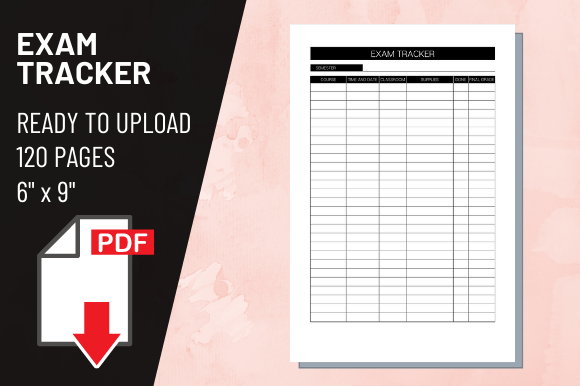
Creating a functional study aid for Amazon KDP requires more than just arranging lines on a page. When publishing an exam tracker KDP interior, the difference between a professional resource and a frustrating notebook often lies in technical precision and user-centric design. Many creators focus heavily on cover aesthetics while neglecting the specific dimensional and resolution requirements of the interior file. A well-executed 6″ x 9″ exam tracker serves students, professionals, and lifelong learners by providing a structured space to log study hours, track progress, and manage revision schedules. However, without adherence to strict formatting standards like 300 DPI resolution and correct bleed settings, even the most beautifully designed tracker can fail during the printing process or disappoint customers upon delivery.
Understanding Technical Specifications for Exam Trackers
The foundation of any successful KDP Interior Exam Tracker is the PDF file itself. While it may seem basic, uploading a file that does not meet exact print specifications is the most common point of failure for new publishers. For a standard 6″ x 9″ trim size with no bleed, your document must be exactly 6 inches wide by 9 inches tall. There should be no extra margin added for trimming if you have selected the "no bleed" option in your KDP setup. Adding extra space under the assumption that KDP will automatically crop it often results in rejected files or shifted content that ruins the layout.
Resolution is equally critical. Your high-quality PDF file must be exported at 300 DPI (dots per inch). Screens display images at 72 or 96 DPI, which looks crisp on a monitor but appears pixelated and blurry when printed. Text in an exam tracker needs to be razor-sharp because users will be writing small notes and checking off tiny boxes. If your source file was created at a lower resolution and then upscaled to 300 DPI before export, the quality will still suffer. Always set your canvas or document properties to 300 DPI before you begin designing. This ensures that every line, header, and instruction renders clearly on physical paper.
Common Layout Mistakes That Ruin Usability
Beyond technical file specs, the internal architecture of an exam tracker KDP interior determines whether a customer actually uses the product. A frequent error is insufficient gutter margin. In a 6″ x 9″ book, the binding eats up space on the inner edge of the page. If your tracking tables extend too close to the spine, users will struggle to write in those columns without breaking the book's binding or straining their wrists. For a 120-page book, a safe gutter margin is typically at least 0.375 inches, though many experienced designers prefer 0.5 inches to ensure ample writing room. Always preview your interior using KDP’s digital proofer or order a physical proof copy to test writability before listing.
Another oversight involves line weight and contrast. While dark, thick lines look bold on screen, they can appear heavy and distracting on matte paper. Conversely, lines that are too thin may break up during printing or disappear entirely. Aim for a balanced stroke weight that guides the eye without dominating the page. Additionally, avoid using pure black backgrounds or large solid ink areas in a no-bleed design. Ink saturation issues can cause pages to stick together or warp, especially in smaller trim sizes. Stick to clean, minimalist layouts with plenty of white space to enhance readability and prevent printing defects.
Evaluating Content Structure Before Publishing
Functionality extends beyond margins and lines; it encompasses the logical flow of information. A generic "study log" often fails because it lacks specificity. Before finalizing your KDP Interior Exam Tracker, ask yourself who the end-user is and what metrics they actually need to track. A nursing student preparing for the NCLEX has different tracking needs than a CPA candidate or someone learning a new language. Including irrelevant columns wastes valuable page real estate in a compact 6″ x 9″ format.
- Define the Tracking Metrics: Ensure columns for date, subject/topic, duration, method (reading/practice test/video), and confidence level are present and appropriately sized.
- Include Progress Summaries: Dedicate pages at the end of sections or the book for monthly reviews, score trending, or reflection notes to add long-term value.
- Test the Writing Space: Verify that rows are tall enough for handwriting. Standard college-ruled spacing is approximately 9/32 inch; anything smaller becomes difficult to use with pens or pencils.
- Check Page Count Efficiency: With 120 pages, ensure the ratio of instructional/introductory pages to actual tracking pages is reasonable. Users pay for utility, not filler.
Avoiding File Preparation Errors
Even with perfect design, errors during the export phase can compromise your exam tracker KDP interior. One subtle but damaging mistake is failing to embed fonts. If your PDF relies on system fonts that aren't embedded, KDP’s printer may substitute them, altering spacing, alignment, and overall appearance. Always choose "Embed All Fonts" in your PDF export settings. Similarly, flatten your PDF if it contains complex layers, transparencies, or effects. While vector text is ideal for sharpness, unflattened transparency layers can sometimes cause rendering artifacts during the RIP (Raster Image Processor) stage at the print facility.
Color profile selection also matters. Unless you are paying for premium color, your interior should be designed and exported in grayscale or CMYK with rich black values optimized for black-and-white printing. Designing in RGB and converting later can lead to unexpected gray tones where you intended solid blacks, or muddy grays where you wanted light guidelines. Set your document color mode correctly from the start to maintain full control over the final output.
Making Informed Decisions for Better Results
When selecting or creating a KDP Interior Exam Tracker, prioritize practical validation over assumptions. Do not rely solely on software previews. Order a physical proof copy to test paper texture, binding tightness, and ink absorption. Write in it with different pens to check for bleed-through or feathering. Assess whether the 6″ x 9″ size truly accommodates the amount of data entry required, or if a larger format would serve the user better. Remember that portability is the main advantage of this trim size; sacrificing usability for compactness defeats the purpose.
Finally, consider the longevity of the design. Trends in study aesthetics change, but clarity and functionality remain constant. Avoid overly decorative elements that date the product or distract from its primary function. A timeless, clean layout appeals to a broader audience aged 20–50 and maintains relevance across multiple exam seasons. By focusing on precise technical execution, thoughtful user experience, and rigorous pre-publishing testing, you transform a simple PDF into a reliable tool that genuinely supports educational achievement. This attention to detail not only reduces returns and negative reviews but also establishes your reputation as a creator who understands the tangible needs of learners.