School Timeline: Streamlining Visual Planning with Editable Vector Templates
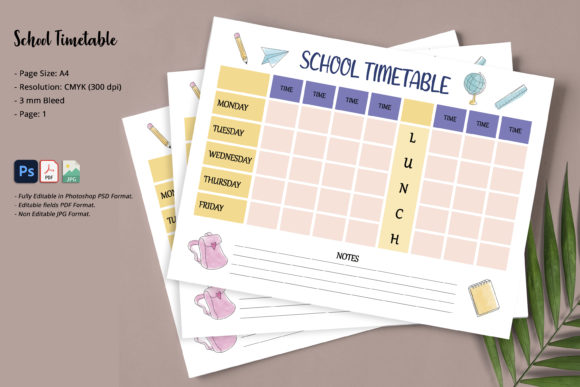
Visualizing the progression of an academic year, a historical era, or a project lifecycle often requires more than just a list of dates. A School Timeline serves as a critical visual anchor, transforming abstract schedules into tangible roadmaps that students, parents, and stakeholders can instantly understand. Whether you are mapping out a semester curriculum, showcasing institutional history for an anniversary brochure, or organizing a personal homeschooling schedule, the clarity of a well-designed timeline cannot be overstated. However, creating these visuals from scratch is time-consuming. This is where a Simple and Minimal School Timeline template becomes an essential asset for educators, marketers, and creators who need professional results without the learning curve of complex graphic design.
Practical Applications Across Educational and Professional Settings
The utility of a structured timeline extends far beyond the classroom wall. Different users leverage this tool to solve specific communication challenges in varied environments. Understanding these real-world scenarios helps clarify why having an editable, high-quality template is necessary.
For Educators and Curriculum Planners
Teachers and department heads frequently use timelines to scaffold learning objectives. When introducing a new unit on ancient civilizations or outlining the milestones of a science fair project, a visual representation helps students grasp the sequence of events. With a minimal template, educators can strip away distracting decorative elements and focus purely on the chronology. Because the included icons and shapes are vector-based, a teacher can easily swap a generic book icon for a microscope or globe within Photoshop, ensuring the visual language matches the specific subject matter without losing design consistency.
Institutional Marketing and Admissions
Private schools, universities, and training centers often need to present their history or upcoming academic calendar to prospective families. In admissions brochures or open house presentations, a cluttered design can signal disorganization. A clean, minimal timeline conveys professionalism and transparency. Marketing teams can utilize the CMYK color profile to ensure that what looks vibrant on screen prints perfectly on glossy brochures or matte flyers. The ability to change colors globally in Photoshop allows branding teams to align the timeline strictly with institutional brand guidelines, maintaining visual identity across print and digital collateral.
Homeschooling and Personal Organization
Parents managing home education often juggle multiple grade levels and extracurricular activities. A printable A4 timeline provides a physical reference point that digital calendars sometimes lack. By using the editable PDF version, parents can quickly type in field trip dates, testing windows, or holiday breaks without needing advanced software skills. For those who prefer full customization, the PSD file allows for creating reusable master templates where only the text changes from month to month, saving hours of formatting time throughout the school year.
Freelancers and Content Creators
Bloggers, textbook authors, and educational content creators require versatile assets that can be adapted for various clients or articles. Purchasing or downloading a template with full vector shapes means owning a flexible design system rather than a static image. If a client needs a timeline for a corporate training seminar one week and a kindergarten orientation the next, the same base template can be recolored and restyled in minutes. This efficiency directly impacts profitability and turnaround time for creative professionals.
Technical Advantages of Vector-Based PSD and PDF Formats
The technical specifications of a timeline template dictate its longevity and ease of use. Many free resources offer rasterized images that pixelate when resized or lack editable layers. Choosing a resource defined by vector shapes and smart organization offers distinct practical benefits.
- Scalability Without Quality Loss: Because all icons and shapes are vectors, you can resize elements to fit different layouts—from a small sidebar graphic to a full-page poster—without any degradation in sharpness. This is crucial for print materials requiring 300 DPI resolution.
- Non-Destructive Color Editing: In Photoshop, vector shape layers allow for instant color changes via the properties panel. You do not need to use magic wand tools or repaint pixels. This makes adapting a "Simple and Minimal" aesthetic to different color themes a matter of seconds rather than hours.
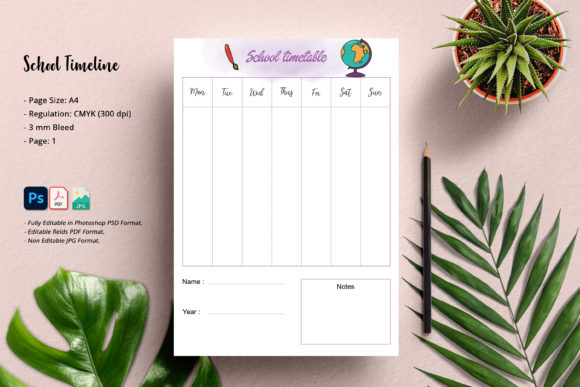
- Print-Ready Specifications: Files configured with A4 page size, CMYK color mode, and 3 mm bleed are ready for professional printing immediately. The bleed area ensures that when the paper is trimmed, no white edges appear, which is a common failure point in DIY design projects.
- Software Accessibility: Compatibility with Photoshop CS6 and above ensures that users with older perpetual licenses are not forced into subscription models. Furthermore, providing an Acrobat Reader editable PDF option democratizes access, allowing users without Photoshop to still update text fields for basic scheduling needs.
Choosing the Right Template for Your Workflow
Before integrating a School Timeline template into your workflow, it is important to assess your specific technical capabilities and output requirements. Not every user needs the full PSD package, and understanding the distinction between file types prevents frustration.
If your primary goal is simply to update dates and print a schedule for immediate use, the Editable Fields PDF is likely sufficient. This format locks the design integrity while exposing text fields. It is ideal for administrative staff or parents who want a polished look without the risk of accidentally moving layout elements. However, be aware that this format does not allow for changing icons, colors, or structural layout; it is strictly for data entry.
Conversely, if you anticipate needing to rebrand the timeline, alter the spacing of events, or integrate custom photography, the Photoshop PSD is mandatory. Users should verify they have at least Photoshop CS2 or newer before downloading. While the file is optimized for modern workflows, checking layer organization previews can save time. A well-organized PSD will group icons, backgrounds, and text separately, making navigation intuitive even for intermediate users.
Consider also the final destination of the asset. If the timeline is destined solely for social media or web use, the non-editable JPG might serve as a quick proof or background, but it lacks the versatility required for professional print production. Always prioritize the vector-based source files if there is any chance the project will eventually be printed commercially or scaled significantly.
Maximizing Impact Through Minimalist Design Principles
The choice of a "simple and minimal" aesthetic is not merely a stylistic preference; it is a functional decision rooted in cognitive load theory. In educational and informational contexts, excessive decoration competes with the data. When users apply this template, they should resist the urge to over-embellish.
Effective use involves leveraging whitespace to guide the eye along the chronological path. When editing the vector shapes, maintain consistent stroke weights and corner radii to preserve visual harmony. If adding custom photos, consider using clipping masks within the existing vector frames to keep the layout tidy. The goal is to make the information accessible at a glance. For entrepreneurs and marketers, this restraint signals confidence and clarity. For educators, it reduces anxiety for students who might feel overwhelmed by dense textual information.
Ultimately, a School Timeline template is a productivity multiplier. It bridges the gap between raw data and effective visual communication, allowing users across diverse fields to produce high-quality, print-ready materials efficiently. By selecting the right format for your skill level and respecting the minimalist design philosophy, you transform a simple organizational tool into a powerful asset for education, business, and personal planning.